
Custom Graph Grounding
Microsoft 365 Copilot is transforming how enterprises search, analyze, and act on organizational information. Yet fragmented context can lead to unreliable AI responses. Custom Graph Grounding addresses this challenge by connecting enterprise data, relationships, permissions, and trusted sources to Copilot. Combined with Microsoft Graph and Semantic Index, it enables relevant, context-aware responses. Professionals can explore Introduction to Generative AI to strengthen their AI foundation. This article explains how custom grounding improves Enterprise AI and helps organizations build reliable Copilot experiences.
How Does Microsoft 365 Copilot Ground Enterprise Data?
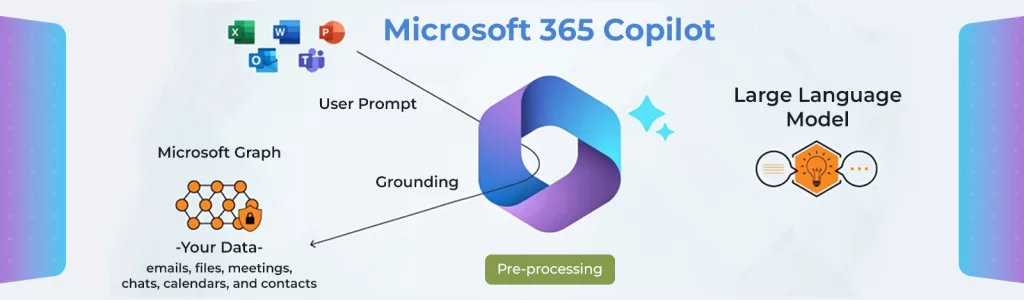
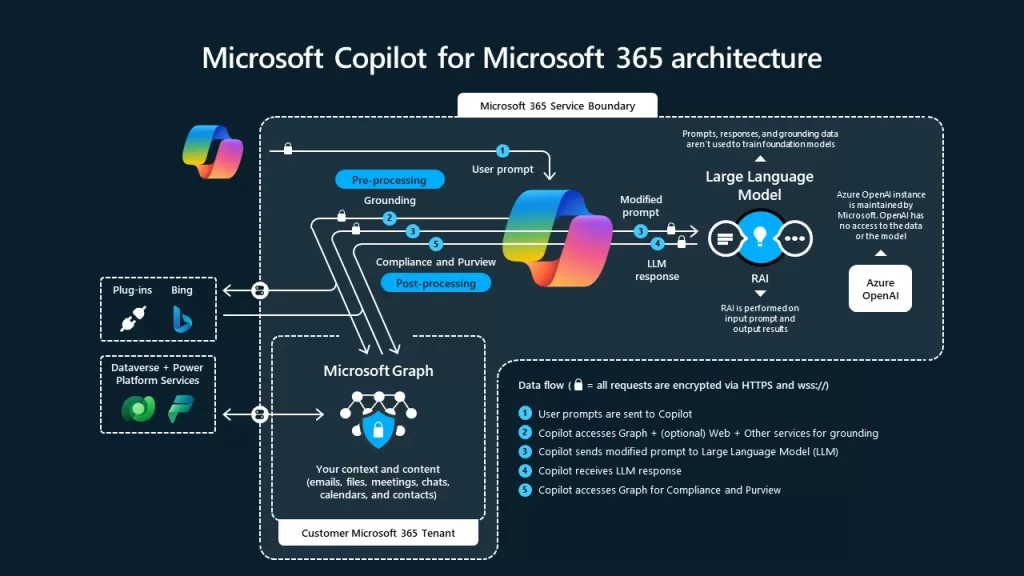
Microsoft 365 Copilot grounding provides relevant organizational information before generating a response. Microsoft Graph helps connect Microsoft 365 content and organizational context, while Semantic Index improves retrieval based on meaning and relevance. In simple terms, the AI model generates the answer, while grounding helps provide the evidence behind it. This is important because enterprise questions often depend on information spread across documents, conversations, applications, and business systems.
What Is Custom Graph Grounding?
Custom Graph Grounding adds business-specific entities, relationships, metadata, and context to enterprise AI systems. Instead of simply finding documents containing a keyword, it helps connect information that explains how business entities relate to one another. For example, answering “Why is this customer at risk of renewal?” may require connections between:
- Customer accounts: These provide information about the customer and account status.
- Contracts: Contract data reveals renewal dates and commercial terms.
- Support tickets: Support history can highlight unresolved customer issues.
- Product usage: Usage patterns can indicate engagement or potential churn.
- Sales activity: Opportunities and meetings can reveal current renewal discussions.
A relationship-aware approach can connect: Customer → Contract → Product → Support Issue → Sales Interaction. This makes Custom Graph Grounding especially useful for complex Enterprise AI questions where relationships matter as much as documents. For professionals interested in building enterprise AI solutions, Building Generative AI Applications with Azure OpenAI provides practical exposure to developing AI-powered applications using Azure technologies.
Why Can Microsoft 365 Copilot Still Hallucinate?
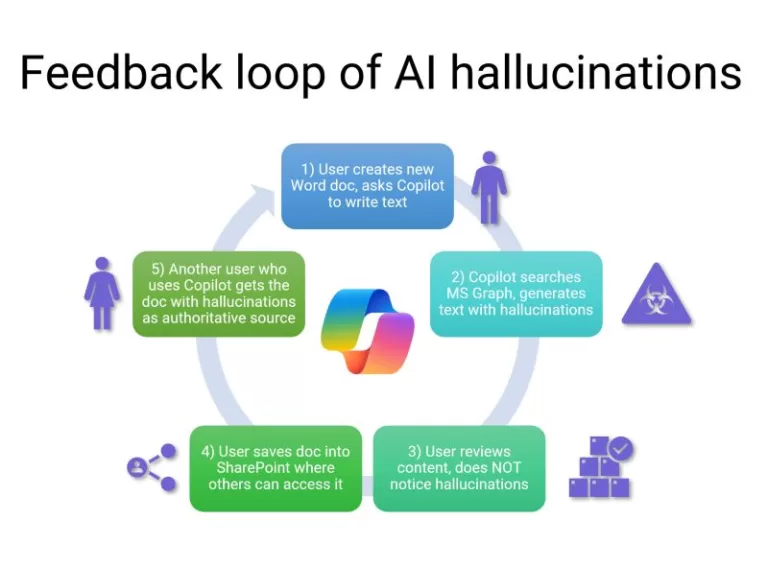
Grounding improves response quality, but it cannot guarantee that every AI response will be correct. Copilot may still lack relevant information when enterprise data is:
- Fragmented: Important context may be distributed across several systems.
- Outdated: Old information can produce responses that no longer reflect current conditions.
- Poorly indexed: Relevant content may exist but be difficult to retrieve.
- Missing metadata: Weak identifiers and descriptions can reduce retrieval accuracy.
- Disconnected: Critical information may reside in systems that are not connected to the AI experience.
- Restricted by permissions: Users may not be authorized to access certain information.
How Microsoft 365 Copilot Grounding Works
A practical grounding workflow can be summarized in five stages:
- Connect enterprise data: Bring relevant information from Microsoft 365 and external business systems into the appropriate AI retrieval environment.
- Normalize information: Organize entities, identifiers, metadata, and business information consistently.
- Build relationships: Connect important entities such as customers, contracts, products, incidents, and support tickets.
- Retrieve relevant evidence: Use semantic and contextual retrieval to identify information relevant to the user’s question.
- Generate the response: Provide retrieved context to the AI model so it can generate a more relevant and evidence-based response.
Organizations can also explore Building AI Agents with Microsoft Copilot Studio to understand how enterprise AI agents can be developed for practical workflows.
Microsoft Graph, Semantic Index, and Copilot Connectors
These technologies address different parts of enterprise AI grounding:
| Technology | Role in Enterprise AI |
|---|---|
| Microsoft Graph | Connects relevant Microsoft 365 organizational information and relationships. |
| Semantic Index | Helps retrieve information based on meaning and contextual relevance. |
| Copilot connectors | Extend Copilot experiences to relevant external enterprise information. |
| Custom Graph Grounding | Adds business-specific entities, relationships, and contextual knowledge. |
Together, these capabilities can provide a stronger foundation for context-aware Microsoft 365 Copilot experiences.
Custom Graph Grounding vs. RAG
Retrieval-Augmented Generation (RAG) retrieves relevant information and provides it to a language model before generating a response. Custom graph grounding can complement RAG by adding relationships between enterprise entities.
| Capability | RAG | Graph Grounding |
|---|---|---|
| Document retrieval | Strong | Strong |
| Semantic retrieval | Strong | Strong |
| Entity relationships | Limited | Strong |
| Relationship-based questions | Moderate | Strong |
| Best suited for | Document-focused questions | Relationship-heavy questions |
RAG is useful when document retrieval is the primary challenge, while graph-aware grounding is valuable when answers depend on relationships across enterprise data.
How to Implement Custom Graph Grounding
Organizations can follow a practical six-step approach:
- Identify high-value questions: Start with business questions that Copilot cannot answer reliably today.
- Map required data: Identify which systems contain the information needed to answer those questions.
- Define sources of truth: Establish authoritative systems for customers, contracts, products, incidents, financial data, and other key entities.
- Model relationships: Create consistent identifiers and relationships between important business objects.
- Protect permissions: Ensure retrieval follows user identity, authorization, and existing access controls.
- Evaluate performance: Measure retrieval relevance, factual accuracy, grounded-answer rate, unsupported claims, freshness, and permission accuracy.
Organizations exploring agent-based enterprise AI can also learn how to build and customize AI agents using Building AI Agents with Microsoft Copilot Studio.
Enterprise AI Use Cases
Customer Intelligence
Connecting CRM, contracts, support, product usage, and meeting data can help Copilot answer questions such as: “What factors are increasing this customer’s renewal risk?”
IT Incident Investigation
Connecting incidents, services, tickets, and engineering documentation can help identify recurring patterns and potential root causes.
Supply Chain Intelligence
Connecting suppliers, inventory, maintenance, and production information can help identify relationships between supplier issues and operational disruptions.
How to Reduce Microsoft 365 Copilot Hallucinations
Organizations should focus on improving the quality of evidence available to Copilot.
- Use authoritative sources: Prioritize systems recognized as the source of truth for important business information.
- Improve metadata: Add useful identifiers, descriptions, timestamps, ownership details, and classifications.
- Keep information current: Regularly review and update enterprise data used for AI retrieval.
- Preserve permissions: Ensure AI retrieval respects existing access and security boundaries.
- Measure retrieval quality: Test whether the right information is actually retrieved for representative business questions.
- Evaluate responses: Track factual accuracy, citations, unsupported claims, and business usefulness.
The objective is not zero hallucinations; it is better evidence, better retrieval, and more trustworthy responses. For a wider view of the Gen AI landscape, take a look at Top 10 Generative AI Tools You Must Learn (With Real Use Cases).
From AI Models to Trusted Enterprise Intelligence
Microsoft 365 Copilot becomes more reliable when enterprise data is connected, current, relevant, and governed. Custom Graph Grounding strengthens this foundation by adding business-specific relationships and context, helping organizations create more accurate and useful AI experiences.
Build the Skills to Lead in Enterprise AI
Explore Big Data Trunk’s practical courses in Enterprise AI, Generative AI, data engineering, and cloud computing.